Video style · Sketchnote
Science explainer videos, drawn like lecture notes.
A science explainer video teaches one process or fact in under a minute. In the sketchnote style, the whole video is a single page of notes drawn in front of the viewer: fineliner outlines, grey marker for volume, one yellow for the thing the story follows, and a final pull-back that leaves a poster worth pausing on.
- Example
- How Bees Make Honey, 0:51
- Drawn with
- Code, no footage
- Works on
Last updated
The example, moment by moment
What happens in How Bees Make Honey
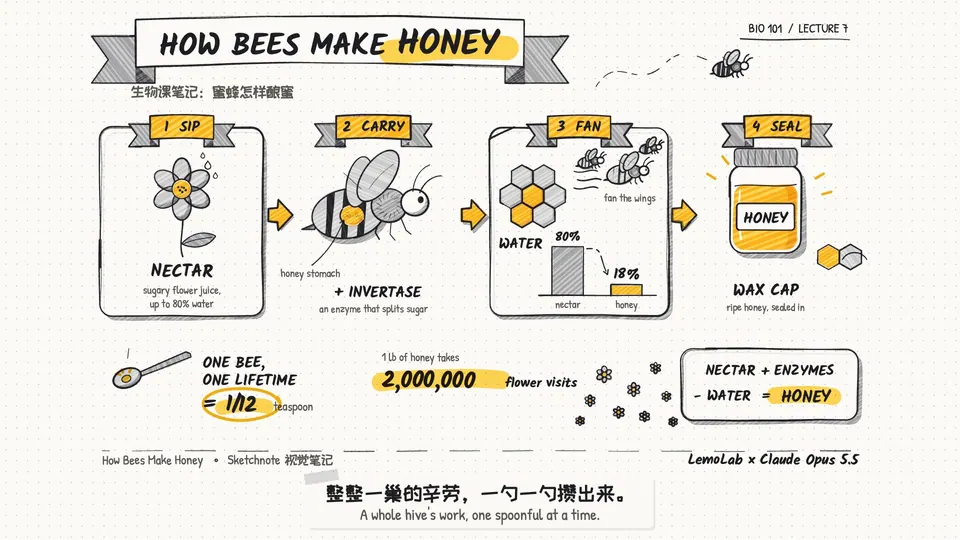
A biology lecture's notes become a film: one bee makes a twelfth of a teaspoon of honey in her life, so the pen follows a single yellow drop from flower to jar until the page is a poster.
-
A spoon is drawn and one yellow drop falls into it. The hook is a number you can see: one twelfth of a teaspoon, a bee's whole life.
-
The question is written on a banner and the camera whips up the empty page to the title, the way a lecturer turns to a fresh sheet.
-
A match cut on a round shape: the flower's yellow centre becomes the bee's honey stomach, and the bee is drawn around it.
-
A dive into the stomach, where a note readable only up close explains how an enzyme splits sucrose into glucose and fructose.
-
Wings fan water out of the nectar, from about 80 percent down to 18, with both numbers held on screen together so the comparison can be read.
-
The camera pulls back while the last strokes finish, and the final yellow loop circles the 1/12 from the opening on a page you could print.
What the sketchnote look is made of
- 01
The frame is the page
Warm white dot-grid paper fills the screen. There is no desk, no notebook edge, no hand and no pen prop, so nothing competes with the drawing.
- 02
Three tools, no more
A black fineliner for lines and lettering, a grey marker in three strengths for shadow and volume, and one yellow reserved for the thread the story follows.
- 03
Drawn at pen speed
Outlines first, then marker, then words, timed to the voice. Nothing fades or slides in, so the pace feels like a person explaining at a board.
- 04
Hand lettering is the type
Titles sit on banners, keywords are written in a bold hand, notes in a thin one. Every letter appears stroke by stroke.
- 05
Planned as a poster
Each note has its place on the final page before the first stroke. The film is the page being made, and the last frame is a sheet you could print.
- 06
The camera rides the pen
It pushes into a drawing, match-cuts between two round shapes, dives into a note written at a tenth of the page's scale, then pulls back to show everything.
Best for
- Science and biology explainers
- Lecture, lesson and chapter summaries
- How-something-works processes with four to eight steps
- One-page summaries of a talk or report
- Facts led by one surprising number
Not for
- Product shots that need realism or texture
- Fast cuts and loud motion
- Stories with characters who act
- Dark, moody or premium-feeling brands
Scene outline
How to make a science explainer video in this style
Fill-in scripts: myth vs fact video , how-to video , explainer video
- 1 0–4 s
The number
Draw one icon and write one surprising number large. The number is the hook, and it should be on screen before it is spoken.
- 2 4–8 s
The question
Write the question the number raises on a banner, then whip to a clean part of the page for the title.
- 3 8–30 s
The thread
Follow one thing (a drop, a cell, a signal) through three to five drawn steps. Only the thread gets the yellow marker.
- 4 30–40 s
The turn
Hold one comparison whole on screen for at least 2.5 seconds: before and after, or a change of scale such as two million flowers for one jar.
- 5 40–50 s
The poster
Pull back as the last strokes finish, and end with the pen circling the opening number so the video closes a loop.
When the sketchnote look is the right call
Sketchnotes work when the subject is a process the viewer has never seen laid out: how honey is made, how a vaccine trains the immune system, why bread rises. The style’s strength is sequence. Each drawing appears where the narrator’s sentence needs it, so the viewer never has to hold a diagram in their head while the voice runs ahead. It is also forgiving of abstract subjects, because an enzyme, a voltage or a probability can be a labelled box with an arrow, and nobody expects a photograph.
It is a poor fit when the subject is the look of a thing. A skincare bottle, a car interior or a plated dish wants texture and light, and a fineliner can only outline them. It also struggles with speed. The pen draws at the pace of a hand, and a script that needs ten ideas in twenty seconds will either rush the drawing or leave half the page empty.
Writing a science explainer for this style
Start from one number that surprises people and can be drawn. One twelfth of a teaspoon is better than “very little”, because the spoon and the drop can be the first thing on the page. Then write the question the number raises, and answer it by following one thing through the process: a drop of nectar, a photon, a red blood cell. Every step gets one drawing and one short line of narration, and only that thread gets the yellow marker.
Keep comparisons whole. If the video says water goes from 80 percent to 18, both numbers should sit on screen together long enough to be read twice. Pick the two numbers you want people to remember before you write anything else.
End with the page. The last ten seconds pull back to the whole sheet, and the final stroke should land on the number from the opening, so the video closes a loop instead of trailing off.
Keeping it readable on a phone
Hand lettering shrinks badly. Keywords need to be written at a size that survives a 9:16 crop, and notes that only matter up close belong inside a dive, where the camera gets within a few centimetres of the page. Keep the bottom of the frame clear for captions, and let the grey marker do the shading rather than adding a second colour, because one accent is the rule that keeps the page readable.
How OpusCar fits
OpusCar builds videos the way this film was built: each scene is rendered from code rather than cut from footage or generated frame by frame, so lettering stays sharp and the same script renders the same video every time. You bring the topic or paste your notes. The script, the voiceover, the animation, the captions and the posting schedule are handled in one flow, and a series of explainers keeps one look from the first episode to the tenth.
Where a science explainer video earns its place
Science explainer FAQ
What is a science explainer video?
A science explainer video is a short video, usually 30 to 90 seconds, that teaches one scientific process, fact or concept with narration and visuals that show the mechanism rather than a presenter. Good ones lead with a concrete number or question, follow one thing through the process, and end with the takeaway on screen.
Why use a sketchnote style for science explainers?
Because the drawing happens at the pace of the explanation. The viewer watches each step appear in the order the narrator says it, which mirrors how a good teacher draws on a board. One accent colour makes the subject easy to follow, and the finished page doubles as a summary that can be screenshotted and shared.
How long should a science explainer video be?
45 to 60 seconds covers one process with a hook, four to six steps and a payoff. Under 30 seconds works for a single fact. Past 90 seconds the subject is usually two videos, and a series of short ones performs better on Shorts and Reels than one long one.
Do I need to draw anything myself?
No. You bring the topic or paste your notes. OpusCar writes the script, records the voiceover, renders the animation and captions as an MP4 and schedules the post. Because the scenes are rendered from code rather than filmed or generated frame by frame, lettering stays sharp at any size.
More video styles
All 11 styles-
 0:59 Isometric infographic
Process explainer
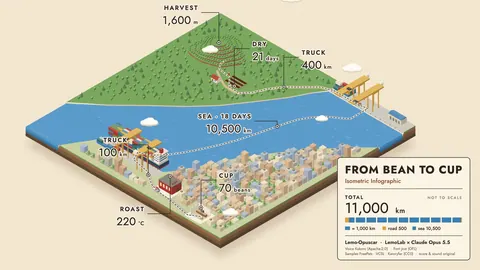
From Bean to Cup: One coffee bean travels from a hillside farm to a cup in a single isometric take: every step is a station on one board, the route is a dashed line, and every number is built from icons. See the process explainer video -
 0:52 Bauhaus shapes
Finance explainer
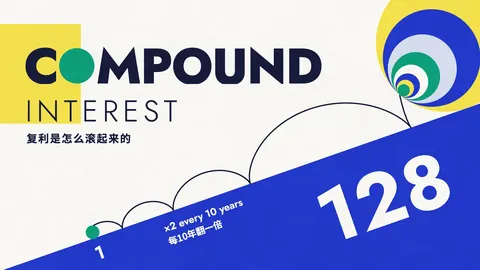
Compound Interest: One green dot doubles every ten years and becomes 128 after seventy; without compounding it would be 6.02, and the last ten years are worth all the rest. Every shape is drawn to scale. See the finance explainer video -
 0:52 Pop art
Pop art explainer
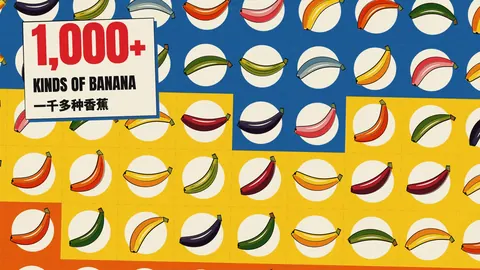
The Same Banana: Almost every banana in the shops is one plant, copied. One poster becomes a wall of prints, the old banana's prints are eaten black by dots, and one tile flipping colour turns into a thousand kinds of banana that add up to one giant banana. See the pop art video
Sign up
Make your first ten videos this week.
Sign up with your email and we’ll get you set up with OpusCar.
We’ll only email you about your account. No spam.