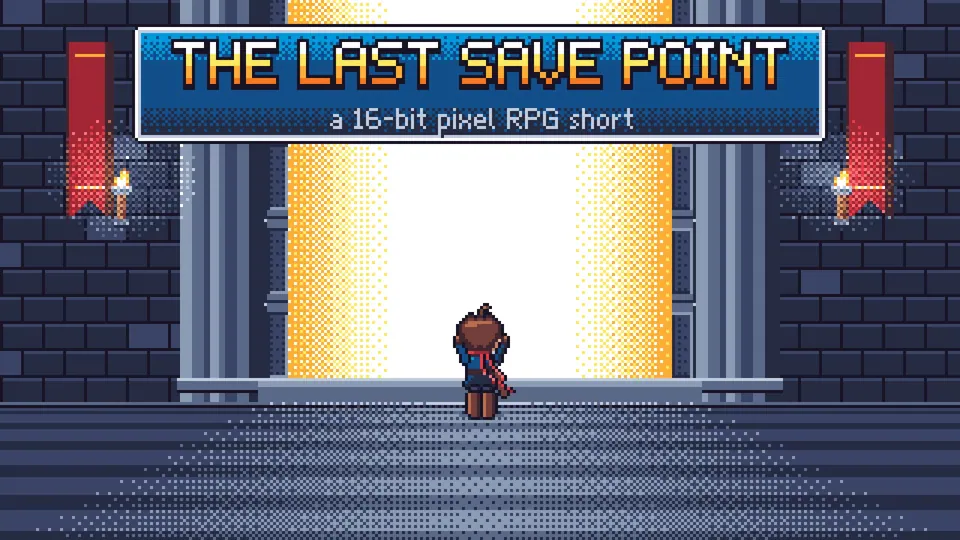
Video style · 16-bit pixel RPG
Pixel art videos in 16-bit RPG style.
A pixel art video draws every frame on a tiny grid with a limited palette, the way a mid-nineties console did: small sprites, dithered gradients, text boxes that type, menus and save files. In the RPG style the game's own systems carry the feeling, so a recap, a farewell or a launch becomes a save screen, a level-up or a new item.
- Example
- The Last Save Point, 0:55
- Drawn with
- Code, no footage
- Works on
Last updated
The example, moment by moment
What happens in The Last Save Point
At the final boss door, a hero saves the game, and the save screen replays the whole journey: memories drawn in fewer colours, a name greyed out in the party list, and full colour flooding back before the last slot is written.
-
A long, quiet scroll through a faded present. The palette has lost most of its colours, and a party list shows one name greyed out.
-
A save screen. The list of files is a list of memories, and the cursor hovers over NEW FILE without choosing it.
-
A memory loads in with a mosaic transition, drawn in fewer colours at lower resolution, the way an older console would have shown it. A red scarf keeps its colour in every era.
-
The memory collapses: the palette drops one level per beat, from 16-bit to 8-bit to four shades, as the system breaks.
-
Resolve. Full colour floods back through an ordered-dither wave, the loudest moment of the film, and the party stands at the final boss door.
-
The hero writes the last save slot, the menu closes, and the end card is a game prompt: CONTINUE.
What the 16-bit pixel RPG look is made of
- 01
320 by 180 native pixels
Everything, text included, lives in a tiny framebuffer scaled six times to 1080p with no smoothing.
- 02
An indexed palette
A limited set of colours, with gradients as ordered dither and never as blends. The whole palette can be swapped in a single frame.
- 03
Palette equals feeling
Colour depth stands for time and mood: older memories have fewer colours, grief is a faded palette, hope is full colour flooding back.
- 04
Protected colours
One or two palette entries exempt from every effect, such as a red scarf, become the thread through the film and allow match cuts between eras.
- 05
Game UI as narration
Dialog boxes with portraits, a greyed-out name in a party list, an item description and a save file say what narration would, in the medium's own words.
- 06
Chip music with echo
Square and triangle waves, a few channels and a long echo, with text blips for a character who now exists only as text.
Best for
- Recaps and year-in-review videos
- Game, app and indie product trailers
- Nostalgia campaigns for a retro audience
- Milestones told as level-ups: funding rounds, launches, a student's year
- Tutorials with a playful voice
Not for
- Premium, minimal or luxury brands
- Realistic product shots
- Dense data
- Audiences who will read the look as a joke
Scene outline
How to make a pixel art video in this style
Fill-in scripts: listicle video , mini story video , timeline video
- 1 0–8 s
The present
Open quiet and faded: a long scroll, a party list, a palette with something missing.
- 2 8–18 s
The system
Show the game screen that will carry the story: a save list, an inventory, a stat screen, a world map.
- 3 18–32 s
The memory or the rise
Shift era by redrawing the same characters in fewer colours, or stack level-ups with a fanfare each.
- 4 32–42 s
The break
Collapse the palette one level per beat, or crash into an encounter swirl, so the viewer feels the system fail.
- 5 42–50 s
Full colour
Flood the palette back through a dither wave on the loudest beat.
- 6 50–55 s
The prompt
End on a game screen that is also a question: CONTINUE, NEW FILE, a save slot written.
When the game’s systems say it better
A sixteen-bit RPG was a set of systems for feeling long before it was a look. Save files are memory. A party list is who is still with you. A level-up is growth you can read as numbers. Dialog boxes type at the speed of a voice, and a character with no voice actor exists only as text blips. The pixel art video borrows all of that, which is why it works for recaps and milestones. A year in review is a save screen with twelve slots. A product launch is an item obtained, with a fanfare and a stat comparison. A career is a level-up screen.
The style fits creators and companies whose audience grew up with these consoles, and products that are playful by nature: games, apps, communities, courses. It is a poor fit for luxury or for anything that must look real, and it fails in front of an audience that reads pixels as a joke.
Writing for an indexed palette
Find the game system hidden in the topic before writing a line. Then plan the palette as the emotional arc. Colour depth can stand for time: older memories have fewer colours and lower resolution. The present after a loss is faded. A collapse is the palette dropping one level per beat, and hope is the full palette flooding back through a dither wave. Changing the whole palette by table in one frame is the style’s biggest move, so spend it at the peak.
Protect one or two colours. A red scarf or a brand colour that never fades becomes the thread through every era and allows a perfect match cut between them. More than two protected colours and none of them mean anything.
Let the UI narrate. A greyed-out name, an item description, a stat that rises with a fanfare. Say as little as possible in text boxes, and let the blips give a voice to characters who have none.
Sound and motion
Chip music with a long echo, a few channels, and sound effects built from the same waves. Sprites animate in a handful of frames and faces act in portraits. Keep transitions in the grammar: a mosaic for gentle memories, an encounter swirl for danger, a white flash on the climax. No scanlines and no grain; this is the console’s output, not a television.
How OpusCar fits
OpusCar renders scenes from code, so the framebuffer, the palette tables and the typing text boxes are generated rather than hand-drawn, and a palette swap is a data change rather than a redraw. Bring the milestone, the system that tells it and the one colour to protect. The script, voiceover or text blips, animation, captions and posting schedule follow in one flow.
Where a pixel art video earns its place
Pixel art recap FAQ
What is a pixel art video?
A pixel art video is an animated video drawn on a low-resolution grid with a limited colour palette, so every frame looks like it came from a classic game console. Sprites, tiles, text boxes and menus are all built from visible pixels, and the image is scaled up without smoothing so the pixels stay sharp.
Why tell a story through game menus?
Because the audience already knows what they mean. A greyed-out name in a party list is a loss, a save file is a memory, a level-up is a milestone, a new item is a launch. The game's systems carry feeling without a word of narration, which is why the style works for recaps.
Can a pixel art video work for a business?
Yes, if the audience grew up with these games or the product is playful. A year in review is a save screen, a funding round is a level-up with stats rising, a changelog is a list of items obtained. Keep a brand colour as a protected palette entry so it survives every palette effect.
How long should it be?
45 to 60 seconds for an arc with a break and a recovery. A 15-second level-up or item fanfare works as a milestone post, and the end-card prompt makes a natural call to action.
More video styles
All 11 styles-
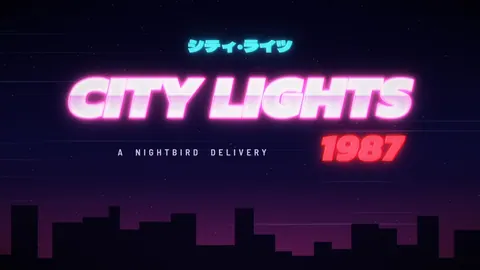 0:59 80s cel anime
Anime-style story
City Lights, 1987: After the rain, a courier nicknamed Nightbird rides a white motorbike across a neon city to deliver a pilot's forgotten cassette to the launch pad before a dawn rocket launch. One hero, one goal, one deadline. See the anime style video -
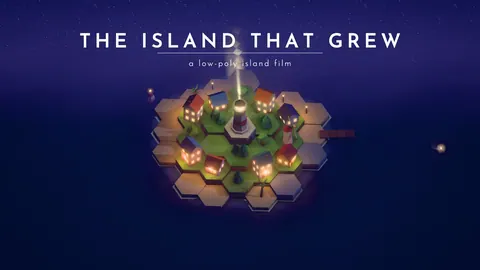 0:53 Low-poly isometric island
Low-poly world
The Island That Grew: An empty sea with a buoy that knows one note. Tiles, trees and houses rise one by one, each landing with a note, so the island and its song are written together, until at night a boat cannot find its way home and the last piece is a lighthouse. See the low poly animation -
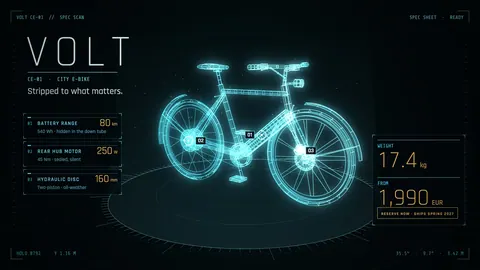 0:39 Hologram HUD
Product spec walkthrough
Volt Spec Scan: A fictional city e-bike is scanned into a glowing wireframe; target boxes lock onto the battery, motor and brakes one at a time, each opens to show the part that makes its number true, and the whole thing lights up into a solid hologram and a spec sheet. See the product spec video
Sign up
Make your first ten videos this week.
Sign up with your email and we’ll get you set up with OpusCar.
We’ll only email you about your account. No spam.